 905-470-7465
Why Healthcare Front Desk Workloads Continue to Grow
Front desk teams are often the first point of contact for patients and visitors. They answer questions, provide directions, check in appointments, share facility information, and help people navigate healthcare environments throughout the day..
As hospitals, medical centres, and clinics become busier, reception staff spend a significant amount of time responding to routine inquiries that could be handled through self-service technology.
At Futuresign, we help healthcare organizations across Ontario implement interactive display solutions that provide convenient access to information, allowing staff to spend more time assisting patients with more complex needs.
How Interactive Displays Improve Healthcare Communication
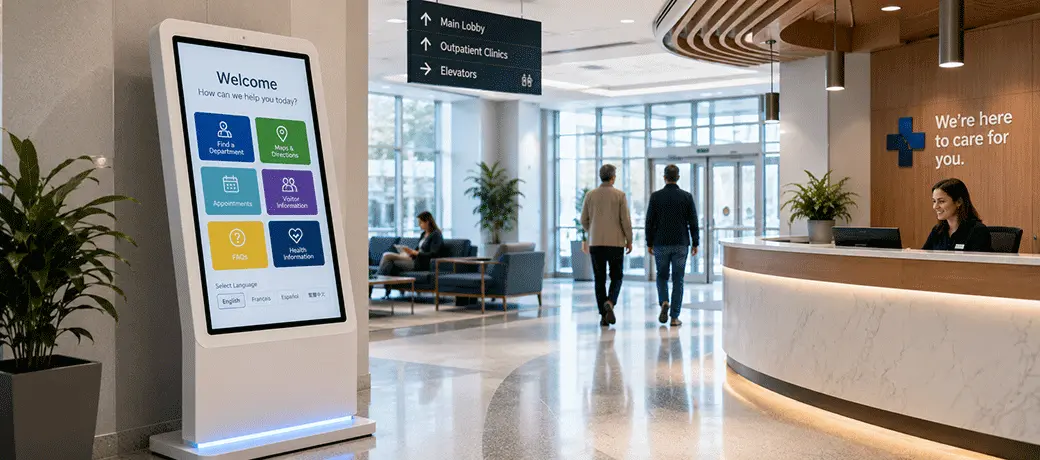
Healthcare interactive displays give patients and visitors immediate access to important information without relying solely on reception staff. Instead of waiting in line to ask routine questions, visitors can quickly access the information they need through interactive touchscreen displays and self-service kiosks.
Interactive displays can provide:
- Digital directories and facility maps
- Appointment and visitor information
- Frequently asked questions
- Hospital services and departments
- Emergency notices and important safety information
- Multilingual content
- Health education and wellness information
Because content is managed through a centralized platform, authorized staff can update directories, announcements, and visitor information across one or multiple displays without replacing printed materials.
How Interactive Displays Handle Common Front Desk Requests
Many reception teams answer the same questions throughout the day. Self-service access to common information helps visitors find answers more quickly while allowing reception staff to focus on requests that require personal assistance.
Patients and visitors can quickly find information about:
- Departments and specialty clinics
- Physician and department directories
- Operating hours
- Visitor policies
- Cafeterias and public amenities
- Pharmacies
- Parking areas
- General announcements and facility updates
Reducing repetitive inquiries creates a smoother experience for visitors while giving reception staff more time to support patients with more complex needs.
Interactive Displays vs. Traditional Front Desk Information
Interactive displays can replace or supplement printed materials by providing timely information and a more flexible visitor communication experience.
| Traditional Reception Communication | Healthcare Interactive Displays |
|---|---|
| Printed directories | Digital directories and touchscreen kiosks |
| Staff answer routine questions | Visitors access information independently |
| Manual sign updates | Centralized content management |
| Static maps | Interactive maps and digital wayfinding |
| Printed announcements | Real-time digital updates |
| Paper brochures | Digital educational content |
Interactive displays complement front desk staff by making routine information available through a convenient self-service experience.
Creating a Better Reception Experience
A busy reception area can feel overwhelming, especially for first-time visitors or patients arriving for appointments. Providing clear, self-service access to information helps visitors feel more confident before they reach the front desk.
| Without Interactive Displays | With Interactive Displays |
|---|---|
| Visitors wait to ask routine questions | Information is available immediately through self-service displays |
| Printed directories and notices | Interactive digital directories and announcements |
| Static facility maps | Searchable maps and navigation tools |
| Manual updates to printed materials | Centrally managed digital content |
By making information easier to access, interactive displays create a more welcoming and organized reception experience while helping visitors navigate the facility with greater confidence before speaking with reception staff.
Why Healthcare Organizations Are Investing in Interactive Displays
Interactive displays can help healthcare organizations modernize communication and create more consistent visitor experiences. Digital content is easier to update, simpler to manage across multiple locations, and more adaptable than traditional printed materials.
Healthcare organizations are investing in interactive displays to:
- Modernize patient and visitor communication
- Reduce reliance on printed materials
- Standardize information across departments and facilities
- Keep content current through centralized management
- Support scalable communication as facilities grow
- Create a more connected visitor experience
Interactive displays provide a flexible communication platform that can adapt as healthcare facilities evolve and visitor needs change.
Modernize Front Desk Communication With Futuresign
Whether you're implementing interactive kiosks, digital directories, or self-service displays, Futuresign helps healthcare organizations deploy interactive display solutions tailored to their communication needs.
From planning and installation to ongoing support, our team works with healthcare organizations across Ontario to implement interactive display systems designed to support clear communication and give patients and visitors convenient self-service access to important information.
Book a consultation today to discuss your healthcare facility's communication goals and explore the right interactive display solution for your organization.
Frequently Asked Questions
Can interactive displays be customized for different healthcare
facilities?
Yes. Interactive displays can be customized for hospitals, outpatient
centres, specialty clinics, physician offices, community health
centres, and other healthcare facilities. Content, branding,
navigation, and functionality can all be tailored to the
organization's needs.
Can interactive displays integrate with existing digital signage?
In many cases, interactive displays can be integrated with existing
digital signage infrastructure. Compatibility depends on the
organization's current hardware, software, and network setup.
Futuresign can assess the existing system and recommend an approach
for managing visitor information, directories, announcements, and
other digital content.
Can multiple interactive displays be managed from one platform?
Yes. Futuresign's digital signage solutions can support centralized
content management, allowing authorized staff to update content across
one or multiple displays from a single location.
Which healthcare facilities benefit most from interactive displays?
Interactive displays can benefit hospitals, medical centres,
outpatient clinics, specialty practices, physician offices, and
community health centres by improving visitor communication and
providing convenient self-service access to information.
How much planning is involved before installing interactive displays?
Planning typically includes evaluating facility layout, visitor
traffic, communication goals, display locations, accessibility
requirements, and future expansion plans. This helps ensure the
solution meets both current and long-term needs.
Can interactive displays be expanded over time?
Yes. An interactive display network can be planned to support future
expansion, allowing organizations to add displays as their
communication needs evolve. This scalable approach can support
additional departments, buildings, or facilities over time.